
描述
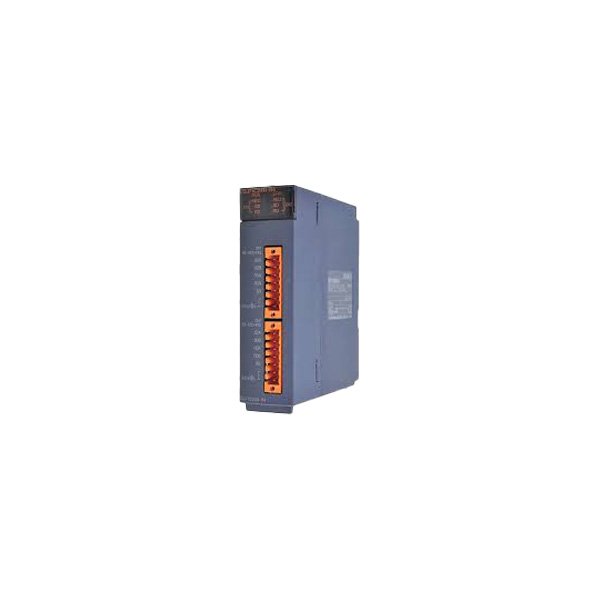
The Mitsubishi QJ71C24N is a serial communication interface module for the Mitsubishi MELSEC-Q Series PLC, providing two independent serial channels — configurable as RS-232C (9-pin D-Sub) and/or RS-422A/485 (terminal block or D-Sub via optional cable) — for connecting the Q CPU to HMI/touchpanels, barcode scanners, printers, modems, or other serial devices.
This module supports:
- MC Protocol (Binary / ASCII): Allows a PC or HMI to read/write Q CPU device memories (D, M, X, Y, etc.) via standard Mitsubishi serial commands — widely used for SCADA, OPC (via serial), and touchpanel links.
- Non-Protocol (User-defined Frame): Send/receive arbitrary ASCII/binary strings via sequential instructions (from ladder —
SEND/RCV/RSwith special D registers for C24N control) — ideal for 3rd-party barcode readers, weigh scales, or printers. - Modbus RTU Slave/Master (on some FW versions — typically supported in QJ71C24N after certain FW rev; check label — earlier may need GX Works2 protocol setting activation): Enables acting as Modbus RTU slave to a Modbus master (e.g., 3rd-party HMI/SCADA) or polling Modbus slave devices (weigh scale with Modbus RTU).
- Data Link (Optional — C24N can do simplified peer-to-peer serial linking between Q PLCs with C24N modules — less common than MELSECNET/H but possible for small data exchange)
The module occupies one Q-series I/O slot and is configured in GX Works2 → Parameter → PLC Parameter → I/O Assignment → double-click the C24N module row → Serial Communication Setting.
Key Features
- Channels: 2 independent serial ports (Ch.1 & Ch.2) — each can be set RS-232C or RS-422A/485 independently (physical interface depends on port type: Ch.1 = 9-pin D-Sub (RS-232C natively; RS-422 needs QC24N-R4 or cable adapter); Ch.2 = Terminal Block (RS-422A/485 native; RS-232 possible with adapter — check manual)
- Max. Baud Rate: Up to 115.2 kbps (some FW 230.4 kbps — verify)
- Protocols: MC (Binary/ASCII), Non-Protocol (user frame), Modbus RTU (Slave/Master — FW dependent), Simple Link (C24↔C24)
- Isolation: Photocoupler isolation on RS-422/485 side; RS-232 typically not isolated port-to-port but isolated from bus
- Diagnostics: Module has RUN/ERR LEDs; communication status monitorable via special relays (SM) and buffers (BFM) in ladder
- Country of Origin: Japan (Mitsubishi Electric)
Model & Variant Reference (Q Series Serial Communication Modules)
Model | Channels | Port Types (Native) | Best For |
|---|---|---|---|
QJ71C24N (listed) | 2 | Ch1: RS-232C (9-pin D-Sub); Ch2: RS-422A/485 (Terminal Block) | General serial — HMI (MC proto), barcode scanner (Non-proto), Modbus RTU scale |
QJ71C24N-R2 | 2 | Both RS-232C (via 2×9-pin D-Sub — needs optional ribbon cable QC24N-R2CAB□) | When both ports need RS-232 (e.g., 2 HMIs or PC + HMI) |
QJ71CMO | — | — | MELSECNET/H (not serial — listed for contrast — do NOT confuse C24N with CMON/H!) |
QJ61BT11N | — | — | CC-Link Master/Local — also not serial — contrast only |
⚠️ Important Installation & Wiring Notes:
Technical Specifications (QJ71C24N — 2-Ch Serial Interface, RS-232C + RS-422/485)
Parameter | Specification |
|---|---|
Model / Order Code | QJ71C24N (Mitsubishi MELSEC-Q Serial Communication Module) |
No. of Channels | 2 Independent (Ch.1 & Ch.2) |
Ch.1 Interface | 9-pin D-Sub (female) — Native RS-232C; RS-422/485 possible with external converter |
Ch.2 Interface | Removable Screw Terminal Block (8-term.) — Native RS-422A/485 (TxD+/-, RxD+/-, GND, SG) |
Supported Protocols | MC Protocol (Binary & ASCII), Non-Protocol (User Frame — via SEND/RCV inst.), Modbus RTU Slave/Master (FW dependent, enabled in param), Simple Link (C24↔C24) |
Baud Rate | 300 / 600 / 1200 / 2400 / 4800 / 9600 / 19200 / 38400 / 57600 / 115200 bps (some FW supports 230400) |
Data Format (MC Proto) | 7-bit / 8-bit data; Even/Odd/None parity; 1/2 stop bits — configurable per channel |
Max. Connection (MC Proto) | 1 session per channel active at a time (but can serve request-response sequentially) |
Isolation (Serial ↔ Bus) | Photocoupler (RS-422/485 side); RS-232 side typically not isolated port-to-port but bus-isolated |
Backplane Current Draw (5V) | ~ 0.25 A (typical — check Q PS capacity) |
Mounting | Q Series base unit (any I/O slot after CPU + PS) |
Dimensions (W×H×D) | 27.4 mm × 98 mm × 95 mm (standard Q single-width module) |
Weight | ~ 0.15 kg |
Operating Temp. | 0 … +55 °C (no freezing/dewing) |
Standards | CE, UL, cUL, KC, RoHS |
Software | GX Developer / GX Works2 / GX Works3 (QnU CPU — set param in “Serial Communication Setting”) |
Warranty & After-Sales
- Factory new units: 12 months warranty
- Refurbished units: 3-6 months warranty (loopback test — connect Ch1↔Ch2 with null-modem or wrap plug → send/receive via GX Works2 monitor)
- Technical support for:
- GX Works2 parameter setup (enable Ch1/Ch2, select MC/Non-Proto/Modbus, set baud/parity/stop, checksum)
- RS-232 null-modem cable pinout (Mitsubishi D-Sub 9-pin vs PC standard — often needs crossed TXD/RXD & DSR/DTR/CD loopback)
- RS-485 daisy-chain wiring (Ch2 terminal block: RDA+/RDA- (receive same as Tx+/- on 422), SDA+/SDA- (send), GND, SG(shield) — termination resistor advice)
- Non-Protocol ladder programming (
SEND/RCV/RSinstructions with C24N special D register usage — BFM read/write) - Modbus RTU configuration (slave address, register mapping — if FW supports)
- Cross-ref to QJ71C24N-R2 (dual RS-232) if both ports need RS-232
- Optional RS-422 converter (QC24N-R4), programming cables (USB-SC09), and termination resistors available
Delivery Time
- Standard delivery: 3-5 working days (stock items)
- Express shipping available upon request
Why Choose Our Store
- Genuine Mitsubishi MELSEC-Q communication modules — not clones with incorrect UART timing
- Global supply network with competitive pricing
- Expertise in Q-series serial comms (MC Protocol, Non-Proto ladder, Modbus RTU, cable pinouts)
- Comprehensive technical documentation (D-Sub 9-pin pinout diagram, GX Works2 param screenshot, RS-485 daisy-chain example)
- Responsive customer service and support
Applications
- HMI / Touchpanel Link: Connect Pro-face / Weintek / Mitsubishi GOT via RS-232 (Ch1) or RS-485 (Ch2) — use MC Protocol.
- Barcode / RFID Reader: Non-Protocol mode — send trigger cmd, receive scanned data into D-registers via
RCV. - Weigh Scale / Print Scale: Modbus RTU Slave (scale as slave → Q reads weight) or Non-Proto ASCII parse.
- PC Data Logging (Legacy): PC with serial port (or USB-RS232 adapter) reads/writes Q CPU D/M registers via MC Protocol — no Ethernet needed.
- Retrofit / Spare: Replace failed QJ71C24N — same article number drops into rack; download parameters (already in PG project) → restart.
评价
目前还没有评价